
Screenshots
Genres
Game Description
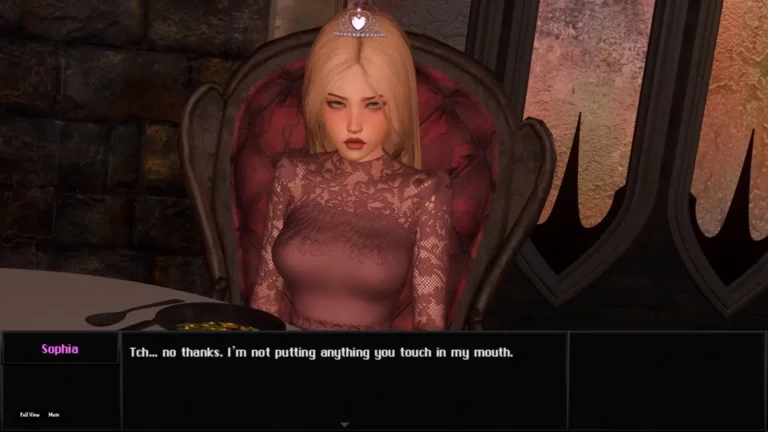
A spoiled princess waits in her tower for a noble savior...
The princess's behavior is shaped by how she’s treated, what she goes through, and how she feels about the player. This doesn’t just affect her dialogue it influences her entire personality, which can evolve naturally over time based on your actions and choices. You can speak to her in multiple styles. Be commanding, manipulative, respectful, provocative, intellectual and more. Each style is a different way to influence her. The princess has deeper emotional layers like Trust, Attraction, Respect, and Fear toward the player. Her emotional state is based on how she feels moment to moment Delight, Anger, Frustration, Shame, Guilt, and more. Beyond that, she has personal traits such as Naivety, Laziness, Acceptance, Comfort, Confidence, and more. These influence how she responds to situations, conversations, and even her daily routine in the castle.
It features over 200 ultra-wide animations (3440×1440) fully explorable with drag-and-view support beyond the 16:9 frame.
Extract and run.
MacArm64_Patch Installation:
1. Download Mac OS version
2. Download Mac Arm Patch: FILEKNOT - ANONZIP
3. Run these commands:
xattr -rc nwjs.app
chmod +x nwjs.app/Contents/MacOS/nwjs
chmod -R +x nwjs.app/Contents/Frameworks
-R nwjs.app/* Game.app/
4. Open nwjs.app to launch the game
How to Play on Android with JoiPlay:
1. Download and install joiplay (additional plugins are not necessary for this game)
2. Download the PC version. Unzip if it is archived.
3. Launch joiplay and scroll through the initial tabs. There is a plus sign at the top right, click on it and specify the path to the "Game.exe" file.
4. Go to the joiplay settings(Three dots on the side.). Select PitT, find the "rpgm settings," and disable "Downscale Large Bitmaps."
5. In the game folder, go to the "www/js" directory and back up the "plugins.js" file.
6. Return to joiplay. Hold your finger on the game icon for a few seconds to open the window. Click on "Edit Plugins." Find "YEP_IconsOnEvents" and disable it.
(7. If you encounter the error "Error Uncaught TypeError: Cannot read properties of null" when trying to start a new game, you need to patch the game. Download the patch. In joiplay, hold down the game icon for a few seconds and select "Patch". Specify the path to the patch and click "ok". ) (Download Patch- Mirror)
MacArm64_Patch Installation:
1. Download Mac OS version
2. Download Mac Arm Patch: FILEKNOT - ANONZIP
3. Run these commands:
xattr -rc nwjs.app
chmod +x nwjs.app/Contents/MacOS/nwjs
chmod -R +x nwjs.app/Contents/Frameworks
-R nwjs.app/* Game.app/
4. Open nwjs.app to launch the game
How to Play on Android with JoiPlay:
1. Download and install joiplay (additional plugins are not necessary for this game)
2. Download the PC version. Unzip if it is archived.
3. Launch joiplay and scroll through the initial tabs. There is a plus sign at the top right, click on it and specify the path to the "Game.exe" file.
4. Go to the joiplay settings(Three dots on the side.). Select PitT, find the "rpgm settings," and disable "Downscale Large Bitmaps."
5. In the game folder, go to the "www/js" directory and back up the "plugins.js" file.
6. Return to joiplay. Hold your finger on the game icon for a few seconds to open the window. Click on "Edit Plugins." Find "YEP_IconsOnEvents" and disable it.
(7. If you encounter the error "Error Uncaught TypeError: Cannot read properties of null" when trying to start a new game, you need to patch the game. Download the patch. In joiplay, hold down the game icon for a few seconds and select "Patch". Specify the path to the patch and click "ok". ) (Download Patch- Mirror)
No patch notes available.
- Dual Core Pentium or equivalent Processor.
- Intel HD 2000 or equivalent Graphics.
- 2.01 GB of free disk space (Recommended to have twice as much free disk space).
Princess in the Tower 2 - Ongoing - v.0.6.2 Download Links
Princess in the Tower 2 is a porn game made on RPGM game engine.
The current available version is v.0.6.2.
The contents of the game are Uncensored. Princess in the Tower 2 is developed by X-Dew.
Please support the developer if you want continued development.
Download links are gathered from public sources. We do not host or modify contents.