
RPGM Ongoing 2D GameAnimatedBig AssBig TitsCorruptionDating SimGropingHandjobMale ProtagonistMasturbationReal PornSandboxTeasingTwins LinuxMacWindows
The Wish
Ongoing v.0.47
- Developer
- The Sex Game's Storie
- Release Date
- 21 July, 2026
- Engine
- RPGM
- Censorship
- Uncensored
- Size
- 868.99 MB
- Version
- 0.47
Screenshots

Genres
Game Description
On an island, a boy makes a wish near a magic crystal (What could go wrong). ![(y)]() This is true porn game where you will have to spend time to unblock the content, if you just want to read and see porn after only a few minutes, it is better to watch after a VN.
This is true porn game where you will have to spend time to unblock the content, if you just want to read and see porn after only a few minutes, it is better to watch after a VN. ![;)]() The game is totally scalable, just increase the character's skill points to get bonuses. Each skill gives a different bonus (end of battle reward multiplier, extra stats, crafting bonus,Fewer "droplets of magic" for manufacturing)
Game Faq
Game in development*, you might need to start a fresh new game on each update (you don't have to do this every time but it can avoid some bugs). And leave a comment where you found a bug for me to fix it. Thanks
*Game in development = Game in beta test
The Video Pack is required for the game to function properly.
The game is totally scalable, just increase the character's skill points to get bonuses. Each skill gives a different bonus (end of battle reward multiplier, extra stats, crafting bonus,Fewer "droplets of magic" for manufacturing)
Game Faq
Game in development*, you might need to start a fresh new game on each update (you don't have to do this every time but it can avoid some bugs). And leave a comment where you found a bug for me to fix it. Thanks
*Game in development = Game in beta test
The Video Pack is required for the game to function properly.
DOWNLOAD IN 2 PARTS. In 1st the game and in 2nd the videopack.
Put all the files from the videopack into the same folder before extracting the .zip (Only the .zip, no need to extract the other files. You can use WinRAR).
For the Windows and Linux version, just put the videos in the folder "The wish ..../www/movies"
For the Mac version, you must put in "The wish V.... MAC\nwjs.app\Contents\Resources\app.nw\movies"
PS : This game is developed to be downloaded and played on PC. Mobile downloads may corrupt the videopack files.
Put all the files from the videopack into the same folder before extracting the .zip (Only the .zip, no need to extract the other files. You can use WinRAR).
For the Windows and Linux version, just put the videos in the folder "The wish ..../www/movies"
For the Mac version, you must put in "The wish V.... MAC\nwjs.app\Contents\Resources\app.nw\movies"
PS : This game is developed to be downloaded and played on PC. Mobile downloads may corrupt the videopack files.
No patch notes available.
- Dual Core Pentium or equivalent Processor.
- Intel HD 2000 or equivalent Graphics.
- 868.99 MB of free disk space (Recommended to have twice as much free disk space).
The Wish - Ongoing - v.0.47 Download Links
The Wish is a porn game made on RPGM game engine.
The current available version is v.0.47.
The contents of the game are Uncensored. The Wish is developed by The Sex Game's Storie.
Please support the developer if you want continued development.
Download links are gathered from public sources. We do not host or modify contents.
Walkthrough and Guide
Tips in the beginning: FILEKNOT
Walkthrough: FILEKNOT
Piper Night Corruption Potion Common Events: FILEKNOT
Piper Night Corruption Potion Map010: FILEKNOT
Fix Valentina Q43: FILEKNOT
Videos freeze:
As I just explained above, it's not only the win7 that can work, you have to test the other compatibility modes, check that the drivers are up to date and you can use the compatibility problem resolution (just above the compatibility mode).
(Right click, property, compatibility tab)
PS : If the screen is black at the time of the videos, it's not a freeze, you just forgot to download the videopack or it wasn't placed in the right place.
PS2: There is also a last solution but I don't know if it's true, just stop using RPGmaker MV and use MZ. I put it in my objectives that if I have 50 paying subscribers, I change the program.
White video:
Just to put it out there (didn't see a result when searched, but I also didn't fully read through all 66 pages to verify);
If the videos play as a nearly all white / super washed out - disable HDR in the windows display properties (it's what worked for me, anyway...
Can't open setting (bag):
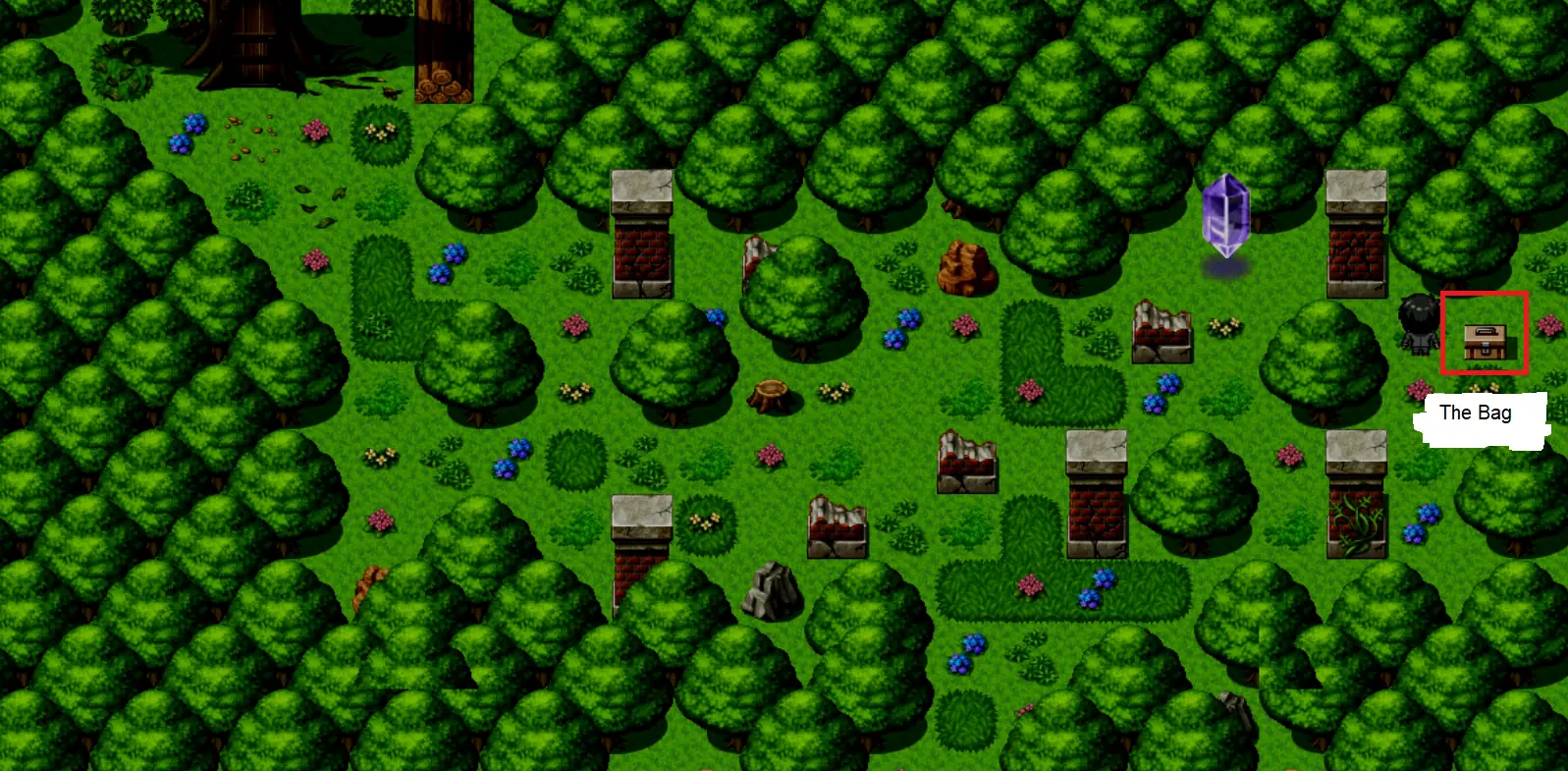
Walkthrough: FILEKNOT
Piper Night Corruption Potion Common Events: FILEKNOT
Piper Night Corruption Potion Map010: FILEKNOT
Fix Valentina Q43: FILEKNOT
Videos freeze:
As I just explained above, it's not only the win7 that can work, you have to test the other compatibility modes, check that the drivers are up to date and you can use the compatibility problem resolution (just above the compatibility mode).
(Right click, property, compatibility tab)
PS : If the screen is black at the time of the videos, it's not a freeze, you just forgot to download the videopack or it wasn't placed in the right place.
PS2: There is also a last solution but I don't know if it's true, just stop using RPGmaker MV and use MZ. I put it in my objectives that if I have 50 paying subscribers, I change the program.
White video:
Just to put it out there (didn't see a result when searched, but I also didn't fully read through all 66 pages to verify);
If the videos play as a nearly all white / super washed out - disable HDR in the windows display properties (it's what worked for me, anyway...
Can't open setting (bag):