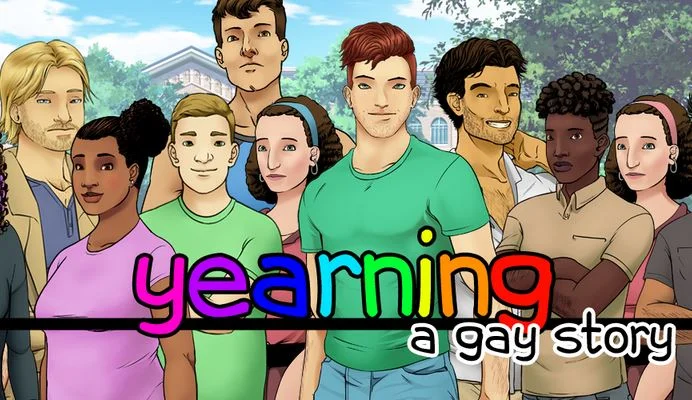
Yearning: A Gay Story
Finished v.Final
- Developer
- Bob C Games
- Release Date
- 18 July, 2021
- Engine
- Ren'Py
- Censorship
- Uncensored
- Size
- 149.3 MB
- Version
- Final
Genres
Game Description
Yearning: A Gay Story (YAGS for short) is a coming-out-focused character-driven slice-of-life visual novel with dating sim elements where you play as a gay man starting his freshman year of college at a generic university somewhere in the midwestern United States. You will interact with a cast of characters, each with their own personality and stories, as you navigate college life, develop friendships, play board games, and come out. With luck, you might even find a boyfriend.
Windows: Extract the downloaded ZIP file (with a program like WinZip, if necessary), and double-click on YAGS.exe to run.
Mac: Extract the downloaded ZIP file and double-click on YAGS.app to run. If you get an error that the game is from an unknown developer, instead either ctrl-click or right-click on YAGS.app and choose "Open" from the menu.
Linux: Extract the downloaded zipped tarball, and run YAGS.sh from a terminal to launch the game.
Android: Download the APK directly to your phone or tablet and open the file from the file browser on the device. You may get a warning about installing from a source other than the Play store that you will have to accept. Some devices may block installs from APKs.
If you want Uncensored version, check 'Uncensor Patch'
Mac: Extract the downloaded ZIP file and double-click on YAGS.app to run. If you get an error that the game is from an unknown developer, instead either ctrl-click or right-click on YAGS.app and choose "Open" from the menu.
Linux: Extract the downloaded zipped tarball, and run YAGS.sh from a terminal to launch the game.
Android: Download the APK directly to your phone or tablet and open the file from the file browser on the device. You may get a warning about installing from a source other than the Play store that you will have to accept. Some devices may block installs from APKs.
If you want Uncensored version, check 'Uncensor Patch'
No patch notes available.
- Dual Core Pentium or equivalent Processor.
- Intel HD 2000 or equivalent Graphics.
- 149.3 MB of free disk space (Recommended to have twice as much free disk space).
Yearning: A Gay Story - Finished - v.Final Download Links
Yearning: A Gay Story is a porn game made on Ren'Py game engine.
The current available version is v.Final.
The contents of the game are Uncensored. Yearning: A Gay Story is developed by Bob C Games.
Please support the developer if you want continued development.
Download links are gathered from public sources. We do not host or modify contents.
Walkthrough and Guide
Uncensor Patch Installation:
Note: Uncensoring is only possible for Windows, Mac, and Linux installations.
Android installations cannot be uncensored at this time.
Extract the YAGS archive you downloaded.
Next, find the location where you extracted the game and navigate into the game directory. You should see something like this:
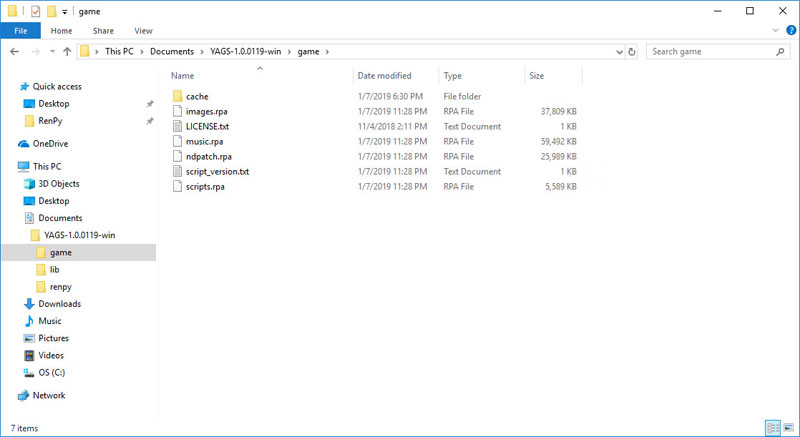
(On mac, right-click on the app and choose "Show Package Contents", then navigate into Contents\Resources\autorun\game.)
Download the YAGS-Uncensor-ndpatch -archive from one of the links above and exctract it.
Find the downloaded and extracted ndpatch.rps -file, and cut it. (Either right-click on it and choose "Cut", or highlight the file and hit Ctrl-X, or Command-X on a mac.).
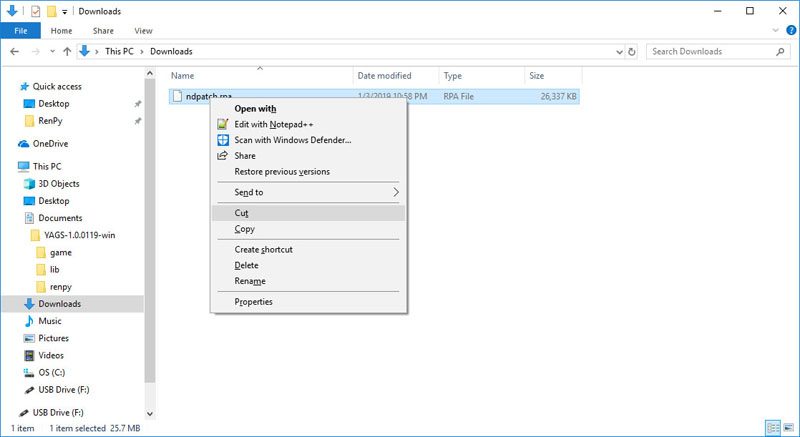
Navigate back to the game directory, and paste the file. (Either right-click in the folder and choose "Paste" or hit Ctrl-V, or Command-V on a mac.)
You should be prompted to replace the file:
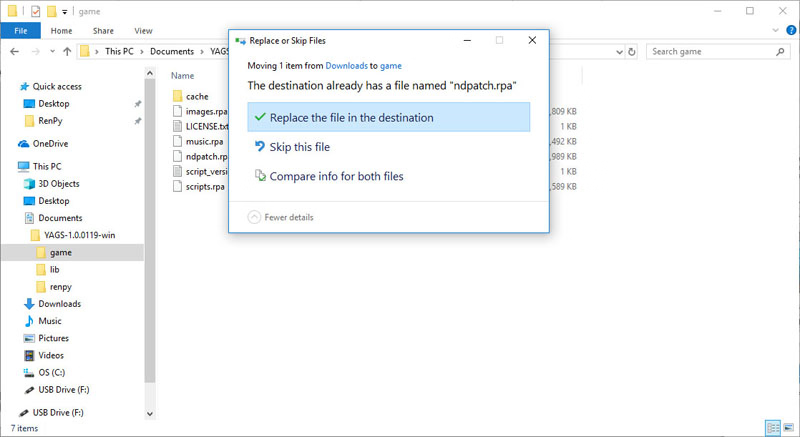
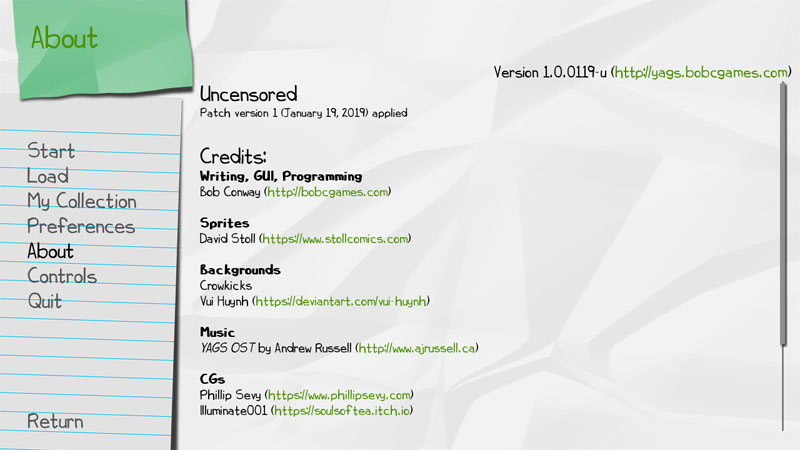
Replace the file and launch the game. The version of your game should now end in -u (for uncensored), and you should have patch information in the "About" screen.
Note: Uncensoring is only possible for Windows, Mac, and Linux installations.
Android installations cannot be uncensored at this time.
Extract the YAGS archive you downloaded.
Next, find the location where you extracted the game and navigate into the game directory. You should see something like this:
(On mac, right-click on the app and choose "Show Package Contents", then navigate into Contents\Resources\autorun\game.)
Download the YAGS-Uncensor-ndpatch -archive from one of the links above and exctract it.
Find the downloaded and extracted ndpatch.rps -file, and cut it. (Either right-click on it and choose "Cut", or highlight the file and hit Ctrl-X, or Command-X on a mac.).
Navigate back to the game directory, and paste the file. (Either right-click in the folder and choose "Paste" or hit Ctrl-V, or Command-V on a mac.)
You should be prompted to replace the file:
Replace the file and launch the game. The version of your game should now end in -u (for uncensored), and you should have patch information in the "About" screen.