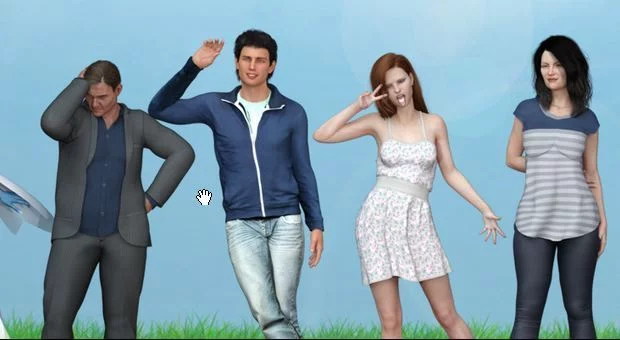
Young Again
Ongoing v.S2 Ch.9 Public
- Developer
- Zargon_games
- Release Date
- 13 July, 2025
- Engine
- Ren'Py
- Censorship
- Uncensored
- Size
- 3.53 GB
- Version
- S2 Ch.9 Public
Screenshots
Genres
Game Description
You start the game as Paul, an old man tired of his life, who after an incident (and by the will of a goddess) he's now in the body of a 19-year-old boy (your character). Your mission is to fulfill a series of objectives for this goddess and thus be able to continue your life in this new body.
Season 2 Chapter 5 Public is pre-patched
Extract and run.
Incest Patch:
Drop the patch file in /game folder
(Links shared here have the Incest patch already applied.)
Incest Patch:
Drop the patch file in /game folder
(Links shared here have the Incest patch already applied.)
No patch notes available.
- Dual Core Pentium or equivalent Processor.
- Intel HD 2000 or equivalent Graphics.
- 3.53 GB of free disk space (Recommended to have twice as much free disk space).
Young Again - Ongoing - v.S2 Ch.9 Public Download Links
Young Again is a porn game made on Ren'Py game engine.
The current available version is v.S2 Ch.9 Public.
The contents of the game are Uncensored. Young Again is developed by Zargon_games.
Please support the developer if you want continued development.
Download links are gathered from public sources. We do not host or modify contents.
Walkthrough and Guide
WALKTHROUGH: FILEKNOT - ANONZIP
TEXT BOX MOD: FILEKNOT - ANONZIP
TEXT BOX MOD INSTALLATION:
TEXT BOX MOD FEATURES: It's an Opacity dialogue Box
That lets you hit the "J" key to take away the box. it saves you from going to preferences to adjust the opacity. sometimes you get a little busy during the game![;)]()
Hit the "K" key in the warm afterglow![:ROFLMAO:]() to bring the box back.
to bring the box back.
WALKTHROUGH MOD SEASON 1: FILEKNOT - ANONZIP
WALKTHROUGH MOD SEASON 2: FILEKNOT - ANONZIP
WALKTHROUGH MOD INSTALLATION:
1. of course the original game must be installed first
2. extract the Mod archive in a temporary folder
3. move the extracted files into your .../game folder
See also the installation info in the ZIP file.
If using my Mod for the first time it's recommended to start a new game.
WALKTHROUGH MOD FEATURES:
- choices help function (ingame walkthrough)
- changing game choices/variables
- renaming for the most important game characters
- a Gallery unlocker
- additional game settings (text font/size/background, quick menu)
- an option to toggle the character side image
(- a "jukebox" function to play the music tracks manually / only Season 1)
(- Walkthrough+ hints when reaching branching points in the game / only Season 1)
most of these functions are optional and can be turned on/off while playing
TEXT BOX MOD: FILEKNOT - ANONZIP
TEXT BOX MOD INSTALLATION:
Add mod to "Game" folder.
When u press Key J, the textbox will be hidden
When u press Key J, the textbox will be hidden
To show textbox, Key K
To increase dialogue text size, ctrl + Right arrow
To decrease dialogue text size, ctrl + Left arrow
To increase dialogue height, ctrl + Upper arrow
For decrease dialogue height, Ctrl + Down arrow
To increase dialogue text size, ctrl + Right arrow
To decrease dialogue text size, ctrl + Left arrow
To increase dialogue height, ctrl + Upper arrow
For decrease dialogue height, Ctrl + Down arrow
TEXT BOX MOD FEATURES: It's an Opacity dialogue Box
That lets you hit the "J" key to take away the box. it saves you from going to preferences to adjust the opacity. sometimes you get a little busy during the game
Hit the "K" key in the warm afterglow
WALKTHROUGH MOD SEASON 1: FILEKNOT - ANONZIP
WALKTHROUGH MOD SEASON 2: FILEKNOT - ANONZIP
WALKTHROUGH MOD INSTALLATION:
1. of course the original game must be installed first
2. extract the Mod archive in a temporary folder
3. move the extracted files into your .../game folder
See also the installation info in the ZIP file.
If using my Mod for the first time it's recommended to start a new game.
WALKTHROUGH MOD FEATURES:
- choices help function (ingame walkthrough)
- changing game choices/variables
- renaming for the most important game characters
- a Gallery unlocker
- additional game settings (text font/size/background, quick menu)
- an option to toggle the character side image
(- a "jukebox" function to play the music tracks manually / only Season 1)
(- Walkthrough+ hints when reaching branching points in the game / only Season 1)
most of these functions are optional and can be turned on/off while playing